Handling and Unpacking
Transport and Initial Placement
The device is supplied packaged and transported using suitable means, usually handled by the manufacturer. If this is not the case, the device must be properly packed using the same packaging provided at the time of purchase. Ensure that the parts inside the packaging are well positioned and secured to prevent movement during transport, which could otherwise damage the device.
Manual Handling
Check the integrity of the device and its components upon receipt.
WARNING

If you notice any damage, missing parts, deformation, or signs of impact from transportation, notify the reseller before proceeding with any further operations.
Unpacking Instructions
During unpacking, check every part of the product to verify its integrity. If damaged, contact the reseller immediately.
Package Contents
Orisview is supplied in a carrying case that is useful for storing the device when not in use and for transport, along with the backpack (sold separately). Inside the case you will find the following items:
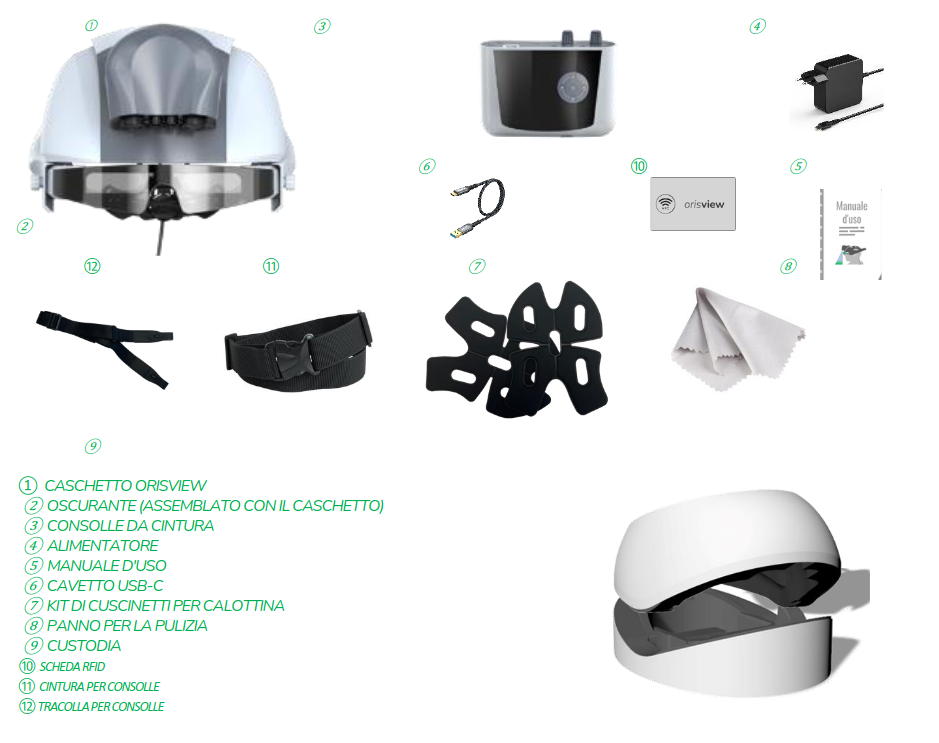
When you open the package, you will find the following components:
- No.1 Orisview Headset
- No.1 Shade (assembled with the headset)
- No.1 Belt Console
- No.1 Power Adapter
- No.1 User Manual
- No.1 USB-C Cable
- No.1 Padding Kit for the inner shell
- No.1 Cleaning Cloth
- No.1 RFID Card
- No.1 Console Belt
- No.1 Console Shoulder Strap
NOTE

TO HANDLE THE HEADSET, CAREFULLY GRASP IT WITH BOTH HANDS, MAKING SURE NOT TO BUMP IT INTO OTHER OBJECTS THAT COULD CAUSE IRREVERSIBLE DAMAGE.