Maintenance
Warnings
Never access parts of the device that are restricted from contact and kept closed by fixed guards (guards that require tools to be removed – e.g., screws). TECHSIGNO S.R.L. has applied security seals and assumes no responsibility for unauthorized interventions involving their removal.
Removing a seal will void the warranty terms.
DANGER
CLEANING AND MAINTENANCE OF THE MEDICAL DEVICE MUST ONLY BE PERFORMED WITH THE DEVICE DISCONNECTED FROM THE POWER SUPPLY.
Routine Maintenance
The medical device does not require special routine maintenance interventions but must be cleaned regularly.
Routine Cleaning
External parts: Remove dust with a dry cloth once a week or whenever necessary. Clean the surface of the medical device to avoid the accumulation of dust and dirt of various kinds. Do not use acidic or basic detergents. Use a dry cloth or one moistened with water and a neutral detergent for cleaning.
Lenses and Display: For cleaning lenses and the display, a microfiber cloth is recommended. If foreign substances are present, clean with a lint-free sterile cloth containing isopropyl alcohol. Be sure to gently wipe the cameras and display lenses of the headset and control cameras.
Deep Cleaning
- Ensure the device is turned off and cooled down.
- Remove mounting kit accessories: remove helmet cushions, the darkener, and the lens holder insert if applied.
- Use disposable disinfectant wipes, such as Super Sani Cloth, Cavi Wipes, or compatible products.
- Clean all device surfaces (including cables and disassembled parts) to remove dirt, debris, or residues.
- Disinfection: using a new wipe, clean all device surfaces (including cables and disassembled parts) and ensure the correct contact time for disinfection according to the wipe’s instructions. Use additional wipes as needed to maintain contact time. (Contact time for Super Sani Cloth and Cavi Wipes is 2 minutes.)
- Rinse the device by wiping it with a cloth soaked in isopropyl alcohol or clean a sterile, lint-free cloth moistened (not dripping) with isopropyl alcohol. Be sure to gently wipe the cameras and lenses of the headset display and control cameras.
- Rinse the device by wiping it with a clean, sterile, lint-free cloth moistened (not dripping) with tap water.
- Dry the device by wiping it with a sterile, lint-free cloth.
NOTE
Use additional wipes if necessary; remember to squeeze out excess liquid so the wipe is moist but not dripping.
NOTE

BEFORE USING EACH NEW WIPE, SQUEEZE OUT EXCESS LIQUID SO THAT IT IS MOIST BUT NOT DRIPPING.
CAUTION
DO NOT POUR OR OVER-SATURATE THE SYSTEM JOINTS, PORTS, OR THE PERIMETER OF THE LENSES.
CAUTION
DO NOT USE ABRASIVE PRODUCTS SUCH AS PAPER TOWELS.
NOTE
IF STERILIZATION IS REQUIRED, CLEAN WITH A CLOTH MOISTENED WITH ALCOHOL. IT IS RECOMMENDED TO USE ALCOHOL AT 70~90%.
CAUTION
USE ONLY A SMALL AMOUNT OF ALCOHOL TO CLEAN THE EXTERNAL PARTS, LENSES, AND 3D VISOR GLASSES. IF ALCOHOL PENETRATES INSIDE THE LENSES OR ELECTRONIC DEVICES, IT MAY CAUSE MALFUNCTIONS OR DAMAGE.
CAUTION
DO NOT USE ALCOHOL ON THE FABRIC STRAPS OF THE CUSHIONS. IF NECESSARY, PROCEED WITH THEIR REPLACEMENT.
CAUTION
ALL INTERVENTIONS, INCLUDING ROUTINE MAINTENANCE, MUST BE PERFORMED BY PERSONNEL WHO HAVE PREVIOUSLY READ THE MANUAL. EXTRAORDINARY MAINTENANCE INTERVENTIONS NOT PERFORMED BY THE AUTHORIZED SERVICE CENTER WILL VOID THE WARRANTY TERMS.
Extraordinary Maintenance
Extraordinary maintenance is required in case of breakdowns or damages due to intensive use, unforeseeable accidents, or inappropriate use of the medical device.
The situations that may arise are completely unpredictable, so it is not possible to describe appropriate intervention procedures.
If necessary, consult the technical service to receive instructions appropriate to the situation.
All extraordinary mechanical or electrical interventions must be carried out by specialized personnel of the manufacturing company (see Authorized Service).
Device Reset
Reset the device by pressing and holding the power button for at least 10 seconds. The device reset keeps the configurations.
Factory Reset of the Device Settings
To restore factory settings, proceed using the graphical interface on the console display.
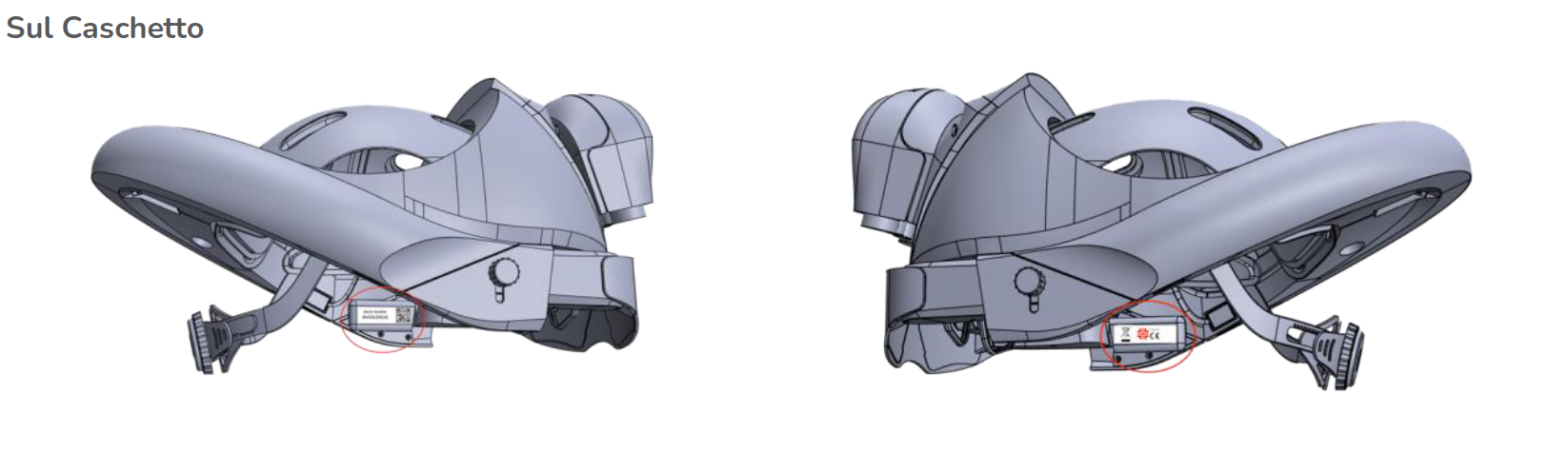
Finding the Serial Number
When contacting us for issues with your Orisview, you will be asked to provide your serial numbers. If you do not know your serial numbers, do not worry: there are several ways to find them.

You can find the serial number on the console. Remove the belt; the serial number will be visible on the back of the console: it will be a 10-character string like T125A15B0220.
Via the graphical interface on the console display
To find the serial numbers while using the device, select on the display:
- System
- Device Information
On the screen that appears, you will find the serial number of the helmet and the console.